
The Editing Dilemma
Every author faces the same terrifying moment: hitting “Publish.” Before that, however, comes the grueling process of editing. Even after a professional human editor, errors slip through. That’s where AI-powered editing software comes in. Grammarly and ProWritingAid (PWA) are the two undisputed champions in this space, but they are built for fundamentally different users. One is a sleek, general-purpose tool; the other is a deep, author-focused diagnostic engine.
Choosing the wrong one can cost you time, money, and—worst of all—bad reviews.
The Quick Verdict
For most authors, especially fiction writers and those concerned with deep style analysis, ProWritingAid is the superior, specialized tool. For the author who primarily writes blog content, emails, or business copy, Grammarly is the better general-purpose choice.
Quick Verdict: At-a-Glance Comparison
Feature | Grammarly Premium | ProWritingAid Premium | Winner |
Price (Annual) | ~$144/year | ~$120/year (often on sale) | ProWritingAid (More affordable) |
Focus | Clarity, Conciseness, Tone (Business/Academic) | Deep Style Analysis, Author-Specific Reports | ProWritingAid (Author Focus) |
Scrivener Integration | No | Yes (Desktop App) | ProWritingAid |
Plagiarism Checker | Yes (Included in Premium) | Yes (Requires separate credits) | Grammarly (Simpler inclusion) |
Best For | Bloggers, Email, Business Authors | Fiction Writers, Developmental Editing | ProWritingAid |
Pricing and Value: One-Time vs. Recurring Cost
The cost structure is the first major difference and a critical factor for authors operating on tight margins.
Grammarly’s Pricing Model: The Subscription Trap
Grammarly operates on a strict subscription model. You pay monthly or annually, and if you stop paying, you lose access to all Premium features.
- Monthly: ~$30/month
- Annual: ~$144/year (best value)
- Free Tier: Excellent for basic grammar and spelling.
While they occasionally offer deep discounts, there is no lifetime option. This is a permanent operating expense for your author business.
ProWritingAid’s Pricing Model: The Lifetime Advantage
ProWritingAid is more flexible. While they offer monthly and annual plans, their Lifetime License is the game-changer for authors.
- Monthly: ~$20/month
- Annual: ~$120/year
- Lifetime: ~$499 (often on sale for $299-$399)
Why the Lifetime License is the Author’s Choice: An author’s income is often sporadic. Paying a single fee for a tool you will use for every book you ever write is a massive financial advantage and a smart business decision.
Core Feature Comparison: Who Catches What?
Both tools check grammar and spelling, but their true value lies in the depth of their style and clarity reports. They approach editing from different philosophical standpoints.
Grammarly: The Clarity-Focused Editor
Grammarly excels at making your writing clear, concise, and professional. It’s designed to ensure your message is understood quickly.
- Clarity: Flags overly complex sentences, passive voice, and unnecessary jargon.
- Conciseness: Excellent at finding wordy phrases and suggesting single-word replacements.
- Tone Detection: A unique feature that tells you if your writing sounds confident, aggressive, or friendly—critical for emails and business communication.
ProWritingAid: The Diagnostic Style Engine
ProWritingAid is built like a laboratory. Instead of one general score, it runs over 25 different reports on your manuscript, each focusing on a specific element of writing craft.
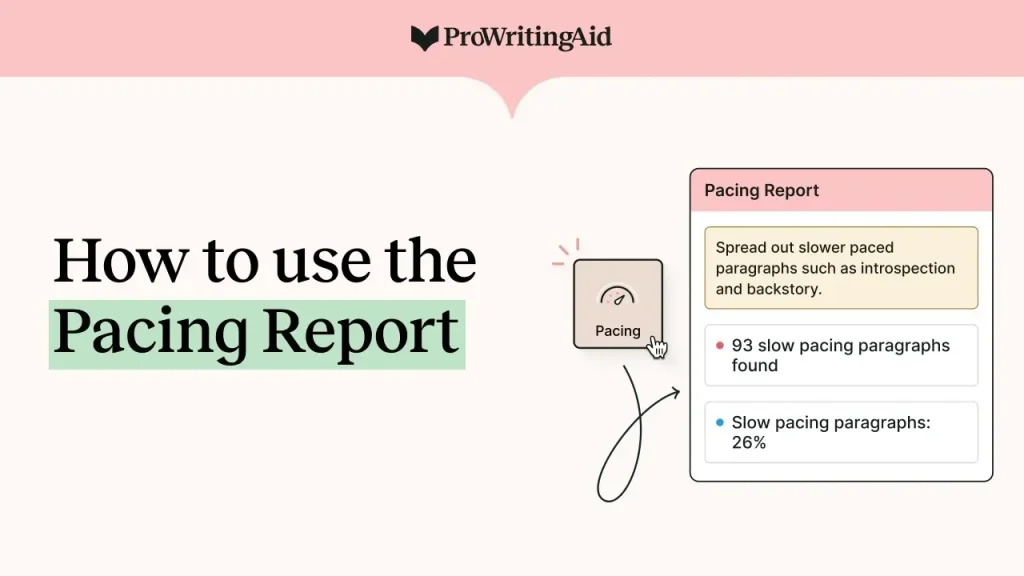
- Pacing Report: Essential for fiction writers. It highlights slow sections (narrative summary) versus fast sections (dialogue/action), helping you manage the reader’s engagement.
- Diction & Cliches: Runs a deep scan for overused words, sticky sentences (words that slow down reading), and clichés.
- Consistency Report: Checks for inconsistencies in hyphenation, capitalization, spelling (e.g., “grey” vs. “gray”), and dialogue tags—a lifesaver for long novels.
Author-Specific Features: The Genre Advantage
This is where the distinction between a general-purpose tool and a specialized author tool becomes most apparent.
Genre-Specific Checks
PWA allows you to set the genre of your writing (Fantasy, Romance, Academic, Business, etc.). This is vital because what is considered “good writing” in a fantasy novel (e.g., descriptive language) is considered “bad writing” in a business report (e.g., wordiness).
- PWA: Adjusts its suggestions based on your chosen genre, offering more relevant advice.
- Grammarly: Offers general “intent” (Academic, Business, Casual) but lacks the granular genre selection of PWA.
Scrivener Integration: A Workflow Game-Changer
If you write in Scrivener (the preferred tool for most novelists), your workflow is key.
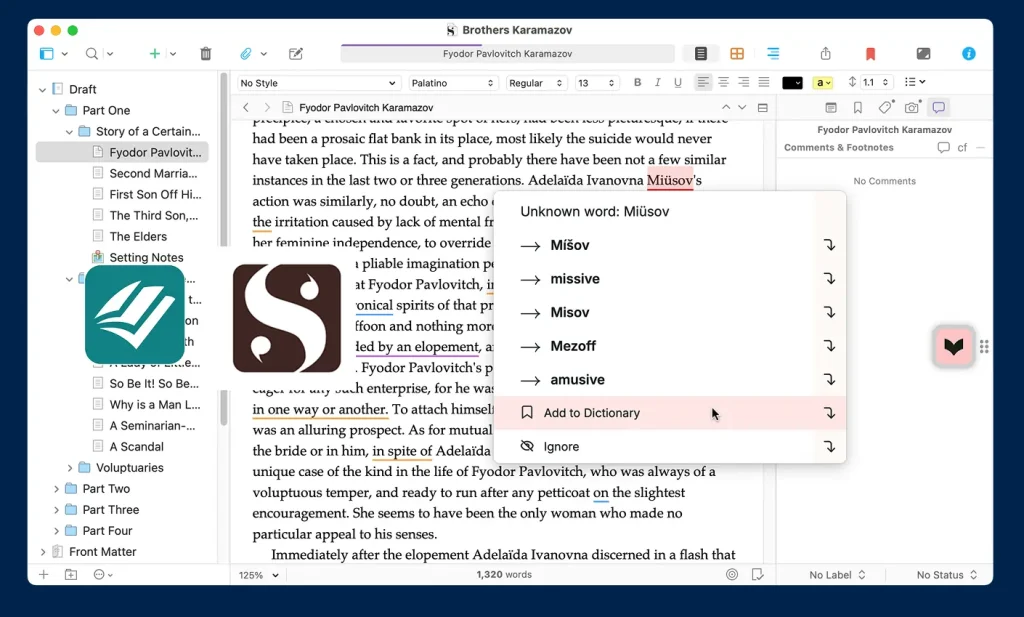
- PWA: Offers a dedicated, powerful Desktop App that integrates directly with Scrivener files. You can edit your manuscript without exporting it.
- Grammarly: Requires you to copy and paste your work into their web editor or use their browser extension/Word add-in. This breaks the seamless flow of a Scrivener-based project.
User Experience, Integrations, and Accessibility
The best tool is the one you actually use. Accessibility and ease of integration into your daily writing life matter.
The Grammarly Experience: Simple and Ubiquitous
Grammarly’s strength is its simplicity and its presence everywhere.
- Ubiquity: Browser extension works in Gmail, social media, and almost any text field online.
- Simplicity: The interface is clean, intuitive, and requires almost no learning curve. Suggestions appear instantly.
- Best for: Quick checks on emails, social media posts, and short blog updates.
The ProWritingAid Experience: Powerful but Cluttered
PWA’s interface can feel overwhelming at first because of the sheer number of reports (25+).
- Power: The ability to run so many reports is its strength, but it requires a learning curve to understand what each report means.
- Integrations: Excellent integrations with Scrivener, MS Word, Google Docs, and an online editor.
- Best for: Dedicated editing sessions where you are actively trying to improve your craft, not just fix typos.
Plagiarism Checkers: A Necessary Evil
Both tools offer plagiarism checks, which are essential for academic authors, but also useful for non-fiction authors who rely on research.
- Grammarly: Plagiarism checking is included in the Premium subscription and is unlimited.
- ProWritingAid: Plagiarism checking requires purchasing separate credits, which can add to the cost if you use it frequently.
Winner: Grammarly offers a more straightforward, all-inclusive plagiarism solution.
Pros and Cons: A Balanced View
Grammarly Premium
Pros | Cons |
Ubiquitous: Works everywhere (browser, email, social). | No Lifetime License: A permanent operating expense. |
Excellent UX: Simple, clean, and fast. | Lacks Author Depth: Reports are general, not genre-specific. |
Unlimited Plagiarism: Included in the Premium price. | No Scrivener Integration (major drawback for novelists). |
ProWritingAid Premium
Pros | Cons |
Lifetime License: Best long-term value for authors. | Steeper Learning Curve: 25+ reports can be overwhelming. |
Author-Focused: Pacing, Diction, and Consistency Reports. | Plagiarism Costs Extra: Requires purchasing credits. |
Scrivener Integration: Seamless workflow for novelists. | Less Ubiquitous: Not as easy to use for quick email checks. |
Final Verdict: Who Should You Choose?
The choice comes down to your primary writing goal.
Choose ProWritingAid If…
- You are a fiction author (novelists, short stories).
- You write in Scrivener.
- You want deep stylistic analysis (pacing, sticky sentences).
- You prefer a one-time purchase to save money long-term.
- Your Goal: Improve your writing craft and run a final, thorough diagnostic before publishing.
Choose Grammarly If…
- You are a non-fiction author, blogger, or academic writer.
- You need a tool for emails, social media, and quick online checks.
- You prioritize simplicity and clarity above all else.
- Your Goal: Ensure your daily communication is polished and professional.
Next Steps: Start Your Free Trial Today
Don’t take my word for it. Both tools offer a free version or a free trial. Test them on a chapter of your current manuscript and see which one feels right for your unique writing style.